If you own a kids clothing brand, run a boutique, sell on marketplaces, or create fashion content for social media, you know how expensive children’s fashion photography can be. Hiring child models, arranging locations, and organizing photoshoots often requires a significant budget and time.
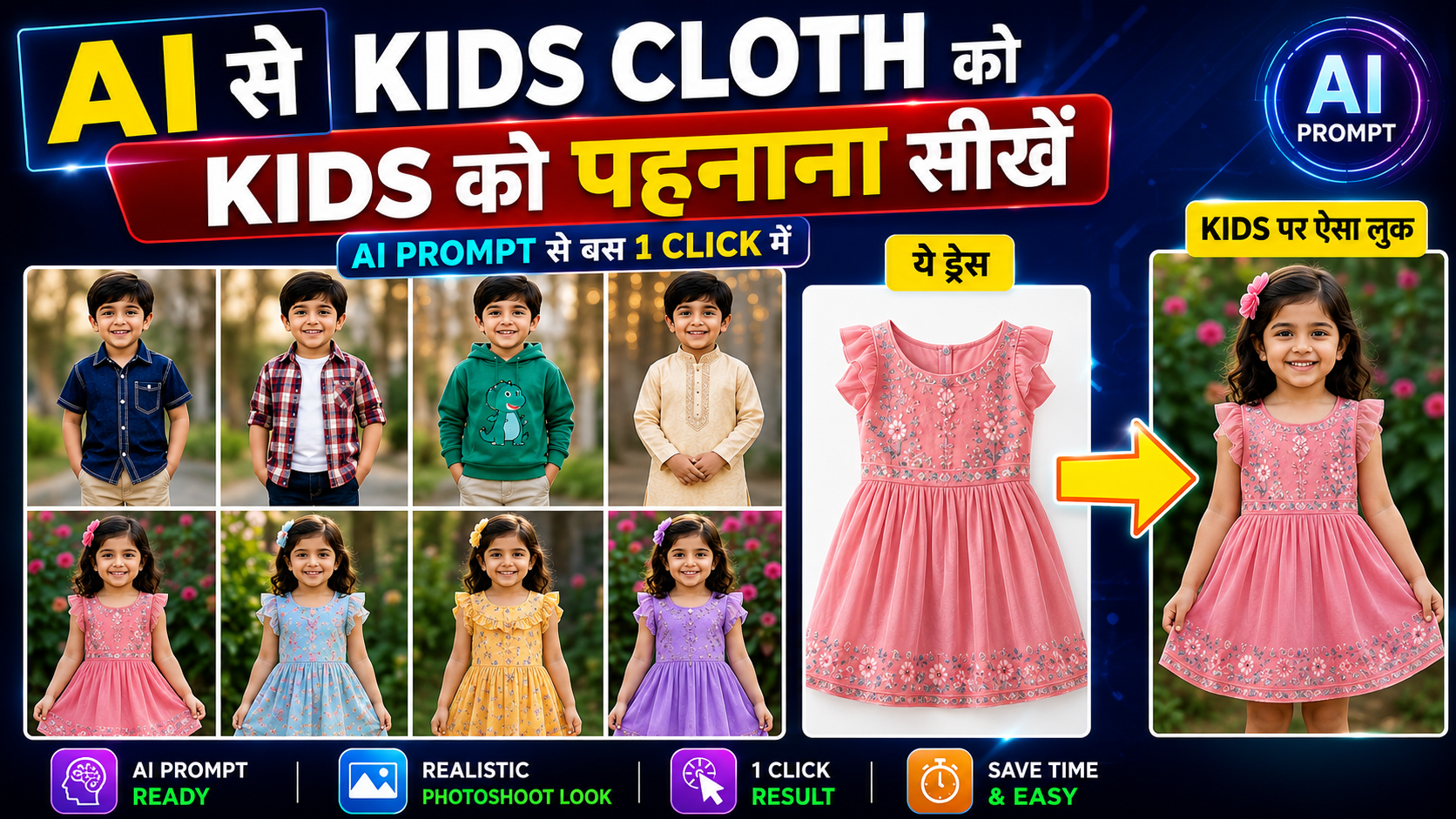
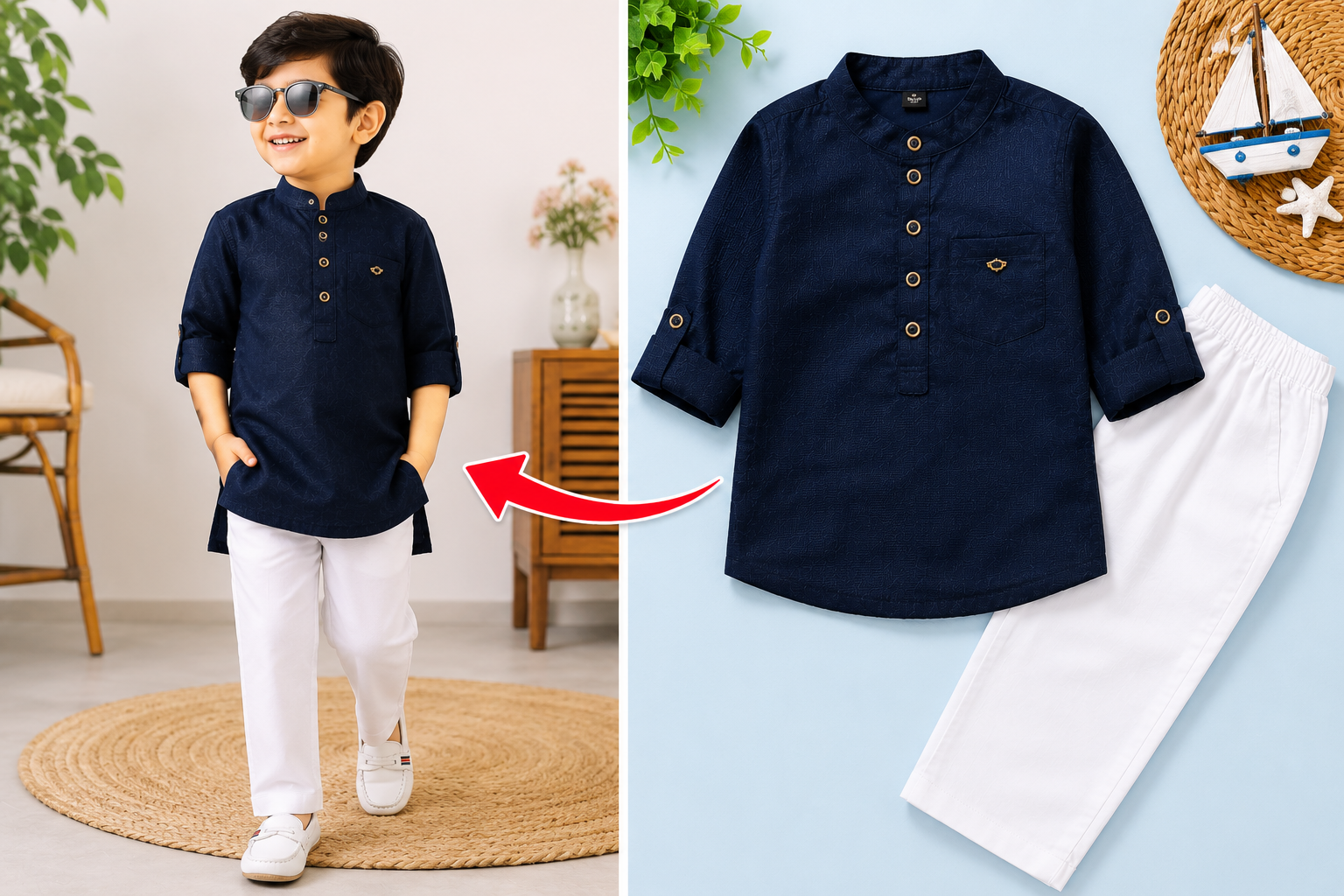
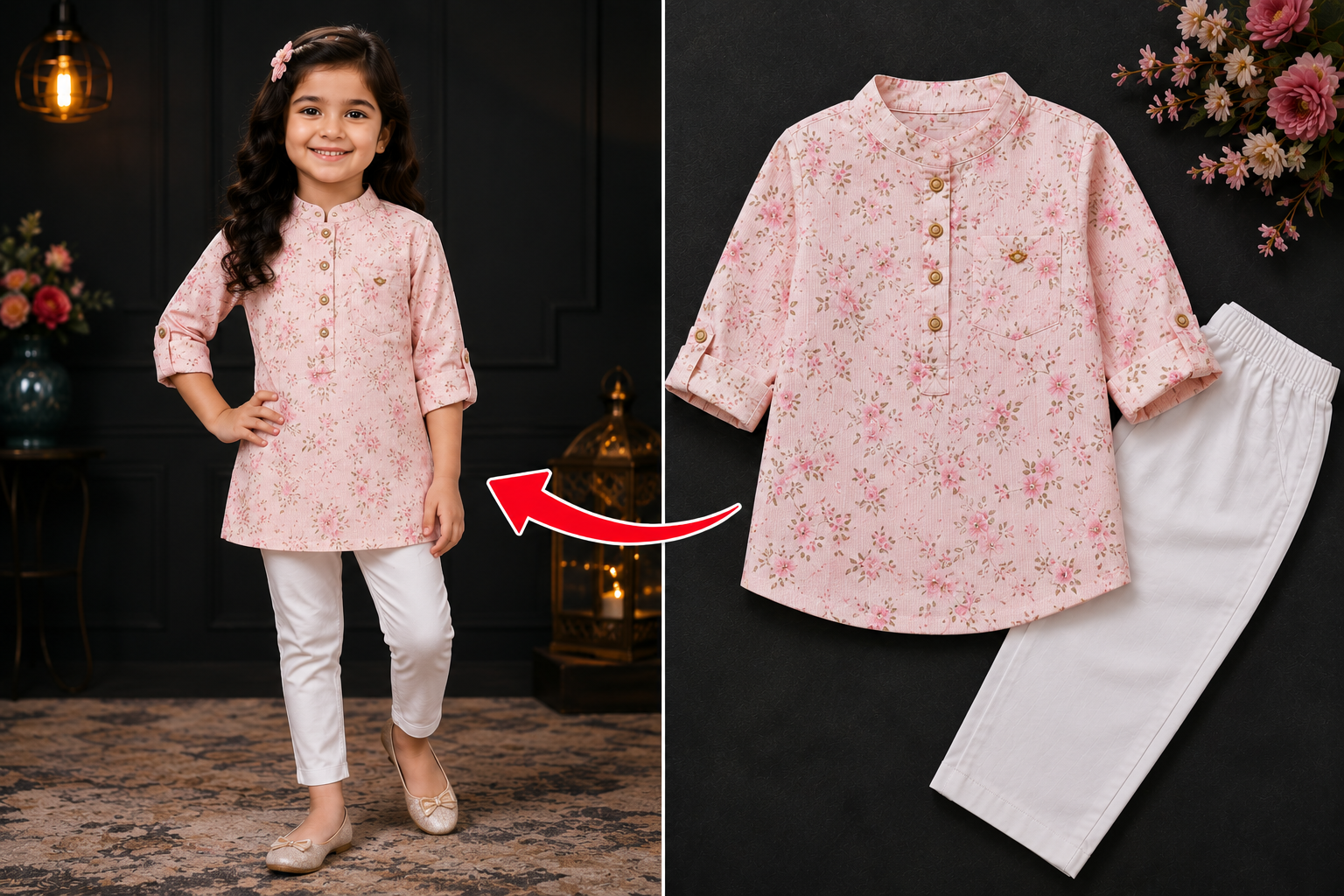
Thanks to modern AI image generation, you can now upload a single dress image and generate an ultra-realistic Indian child wearing the exact outfit within minutes. The key is using a well-structured AI prompt that preserves every detail of the clothing while automatically creating a professional fashion photoshoot.
In this guide, you’ll learn how to create the perfect AI prompt for kids clothing photography, how it works, and how to achieve realistic catalog-quality results.
What Is an AI Kids Fashion Prompt?
An AI kids fashion prompt is a detailed instruction that tells an AI image generator how to create a realistic child model while keeping the uploaded dress exactly the same.
Instead of redesigning the clothing, the AI uses the uploaded dress image as the clothing reference and places it naturally on an Indian boy or girl.
A professional prompt also instructs the AI to preserve:
Fabric texture
Colors
Embroidery
Prints
Stitching
Sleeves
Neckline
Buttons
Accessories
Overall design
The better the prompt, the more realistic the generated fashion image becomes.
×
Master Prompt
Why Clothing Preservation Matters
One of the biggest challenges with AI image generation is that many models modify the original outfit.
For fashion businesses, this is a major problem because customers need to see the actual product—not an AI redesign.
A high-quality prompt specifically tells the AI:
Never change the clothing.
Preserve every design detail.
Maintain the exact colors.
Keep the same embroidery and patterns.
Do not replace accessories.
Do not invent new fashion elements.
This results in accurate product visualization suitable for catalogs, online stores, and advertisements.
Master Prompt
Use the uploaded dress image as the exact clothing reference.
Create an ultra-realistic premium kids fashion photoshoot featuring an adorable Indian girl (5–8 years old) wearing the exact outfit from the uploaded image.
Preserve the outfit 100% unchanged, including the same colors, embroidery, patterns, prints, fabric texture, stitching, ornaments, sleeves, neckline, accessories, and every design detail exactly as shown. Do not redesign, alter, replace, or add anything to the outfit.
The girl should have authentic Indian facial features, a natural Indian skin tone, expressive eyes, beautiful age-appropriate hairstyle, and realistic child proportions. The outfit must fit naturally and realistically.
Pose the child in a cheerful, elegant, and innocent fashion pose that clearly displays the entire outfit from head to toe.
Use soft natural lighting, highly detailed fabric textures, realistic skin details, and premium children’s fashion photography. The background should match the outfit style, such as a festive Indian setting, traditional home décor, a flower garden, or a luxury studio backdrop.
Requirements:
– Indian girl only (5–8 years old)
– Exact outfit preservation from the reference image
– Full-body composition
– No modifications to the dress design
– No extra accessories unless included in the original outfit
– Ultra-realistic photography
– Premium kids fashion magazine aesthetic
– 8K quality
– Cinematic color grading
– Shallow depth of field
– High-end editorial fashion shoot
Generate Realistic Indian Kids Wearing Any Dress
Whether you’re selling traditional Indian wear or modern casual clothing, AI can generate highly realistic Indian child models.
You can create:
Indian girl wearing a lehenga
Indian boy wearing a kurta
Casual kids fashion
Birthday party outfits
School uniforms
Festival dresses
Winter wear
Raincoats
Ethnic clothing
Luxury designer kids wear
The AI automatically adjusts body proportions, facial expressions, lighting, and pose while preserving the uploaded outfit.
AI Can Analyze the Outfit Automatically
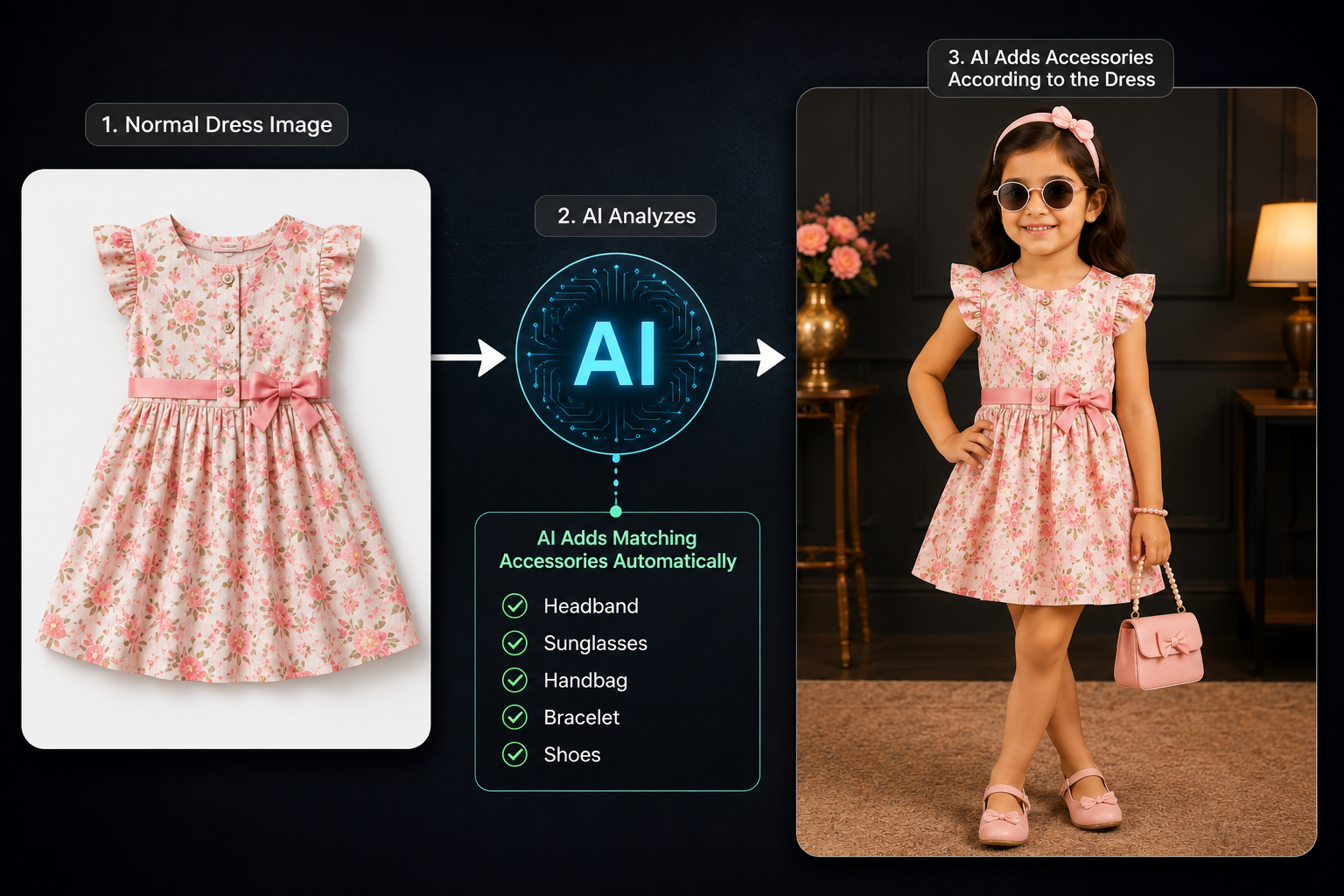
One of the most powerful prompt techniques is allowing the AI to analyze the uploaded clothing and intelligently build the scene.
Master Prompt
Analyze the uploaded outfit and intelligently add suitable accessories, props, footwear, hairstyle, background elements, and environmental details that naturally match the clothing style and purpose.
Examples:
– If the outfit is a raincoat, add a matching umbrella, rain boots, and a rainy outdoor setting.
– If it is a winter outfit, add appropriate winter accessories like a wool cap, scarf, gloves, and a snowy or cozy background.
– If it is a traditional Indian festive dress, add suitable ethnic footwear, subtle festive decorations, and an elegant Indian celebration setting.
– If it is a casual summer outfit, create a bright outdoor environment with age-appropriate accessories.
– If it is a sports outfit, add matching sports equipment and an appropriate sports environment.
– If it is a school uniform, include a school bag, books, and a realistic school setting.
The AI should automatically analyze the clothing category, season, occasion, and style, then add only relevant elements that enhance the scene without changing, covering, or modifying the original outfit.
Important:
– The uploaded outfit must remain 100% identical to the reference image.
– All added props and accessories must be age-appropriate for children.
– Do not add unrelated items or overcrowd the composition.
– Keep the result natural, premium, and suitable for a professional kids fashion catalog.
Instead of manually describing every background, the AI can understand the outfit category and generate matching props.
For example:
Raincoat
Umbrella
Rain boots
Wet road
Rainfall
Cloudy weather
Winter Wear
Wool cap
Gloves
Scarf
Snow
Cozy winter background
Traditional Indian Dress
Festive decorations
Diyas
Flowers
Elegant Indian home
Traditional footwear
School Uniform
Backpack
Books
Classroom
School campus
Sports Outfit
Cricket bat
Football
Tennis racket
Playground
Stadium
The prompt should clearly instruct the AI to add only relevant accessories without modifying the outfit itself.
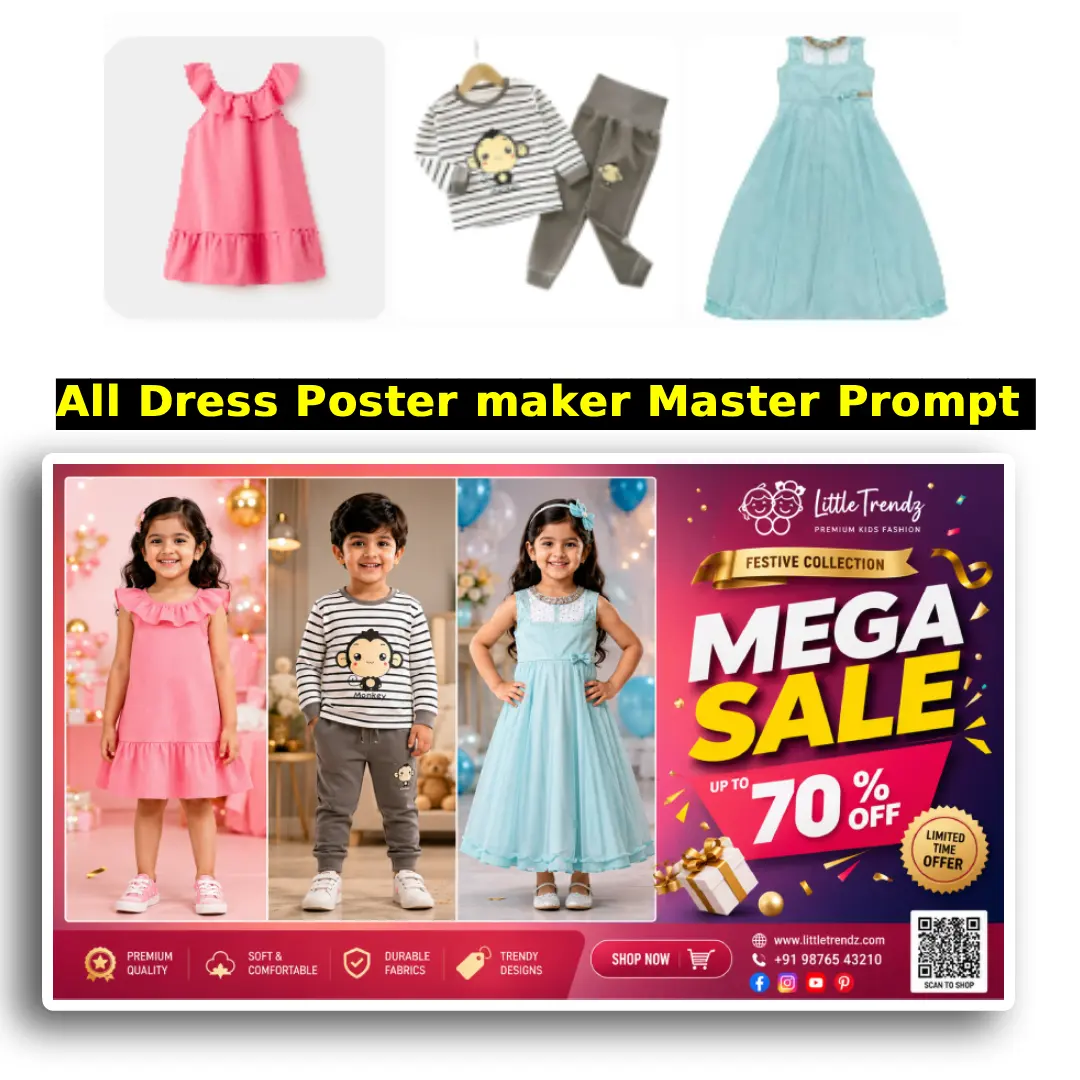
Master Prompt
Use all the uploaded dress images as the exact clothing references.
Create an ultra-realistic premium promotional poster for a kids fashion brand featuring multiple adorable Indian children (boys and girls, ages 4–9) wearing the exact outfits from the uploaded images.
Each uploaded dress must be assigned to a separate child model. Preserve every outfit 100% exactly as shown in its respective reference image, including colors, embroidery, prints, fabric texture, stitching, sleeves, neckline, accessories, buttons, collars, ornaments, patterns, and every design detail. Never redesign, modify, replace, or recolor any outfit.
Arrange all children in a clean, balanced grid layout (2×2, 3×2, 3×3, or automatically based on the number of uploaded dresses). Every child should be fully visible from head to toe, with equal visual importance and enough spacing to clearly showcase each outfit.
The AI should intelligently analyze each outfit and automatically generate matching styling without changing the clothing.
Examples:
• Raincoat → umbrella, rain boots, rainy street
• Winter wear → wool cap, gloves, scarf, snowy atmosphere
• Party dress → balloons, elegant celebration background
• Traditional Indian outfit → festive decorations, flowers, diyas, ethnic footwear
• Casual wear → bright outdoor park or modern lifestyle setting
• Sports outfit → sports equipment and playground
• School uniform → backpack, books, school campus
Only add accessories and props that naturally complement the outfit. Never cover or hide the clothing.
The poster should instantly communicate that a major sale or festival offer is running.
Design Style:
– Premium kids fashion brand advertisement
– Luxury retail store promotional banner
– Modern e-commerce campaign
– Bright, colorful, eye-catching composition
– High-end commercial advertising quality
Include a bold promotional area with large editable typography such as:
“MEGA SALE”
“UP TO 70% OFF”
“Flat Discount”
“Limited Time Offer”
“Festive Collection”
“New Arrival”
“Shop Now”
Leave enough empty space around the promotional text so it remains clear and readable.
Use modern graphic design elements including:
– Discount badges
– Sale stickers
– Decorative ribbons
– Confetti
– Sparkles
– Shopping icons
– Soft gradients
– Premium shadows
– Dynamic geometric shapes
– Subtle arrows directing attention toward featured outfits
The background should be premium, clean, colorful, and luxurious while ensuring maximum focus on the children and outfits.
Lighting:
– Soft professional commercial lighting
– Bright retail advertising look
– Natural skin tones
– Highly detailed fabric rendering
– Realistic shadows
– High dynamic range
Children:
– Authentic Indian boys and girls
– Happy, smiling, energetic expressions
– Natural poses
– Different hairstyles
– Age-appropriate body proportions
– Diverse Indian skin tones
Composition:
– Every outfit must be completely visible.
– No child should overlap another.
– No cropped outfits.
– Equal focus on every dress.
– Balanced premium catalog layout.
Branding:
Leave a dedicated clean area for:
– Brand logo
– Store name
– Website
– QR code
– Contact number
– Social media handles
Do not generate any watermark.
Final Output:
Create an ultra-realistic premium kids fashion sale poster that looks like it belongs to a top clothing brand such as a luxury retail campaign, professionally designed by an advertising agency. The poster should immediately attract attention, create urgency, and encourage customers to shop while showcasing every uploaded outfit exactly as provided.
Aspect Ratio: 16:9
Resolution: 8K
Style: Ultra-realistic, commercial advertising, premium fashion catalog, cinematic lighting, magazine-quality, highly detailed.
Brand Information (Use the following details exactly as provided by the user):
Store Name: [STORE_NAME]
Tagline: [TAGLINE] (Optional)
Address: [STORE_ADDRESS]
Phone Number: [PHONE_NUMBER]
WhatsApp: [WHATSAPP_NUMBER] (Optional)
Website: [WEBSITE] (Optional)
Instagram: [INSTAGRAM] (Optional)
Facebook: [FACEBOOK] (Optional)
Design Instructions:
• Display the Store Name prominently at the top of the poster using a premium, modern, and highly readable font.
• Position the Tagline directly below the Store Name if provided.
• Place the Address, Contact Number, WhatsApp Number, Website, and Social Media handles neatly at the bottom of the poster in a clean information bar.
• Add matching icons for:
– 📍 Address
– 📞 Phone
– 💬 WhatsApp
– 🌐 Website
– 📷 Instagram
– 👍 Facebook
• Reserve a dedicated blank square on the bottom-right corner for a QR Code.
• Ensure all business information is clearly readable without covering any child model or outfit.
• The contact section should blend naturally with the premium fashion poster design.
• Use modern retail branding similar to premium fashion brands.
• If any field is left blank, automatically omit it from the final design without leaving empty spaces.
Offer Section (Editable)
Create a large eye-catching offer section using premium typography.
Examples:
– MEGA SALE
– FLAT 50% OFF
– UP TO 70% OFF
– BUY 2 GET 1 FREE
– FESTIVE SALE
– GRAND OPENING OFFER
– LIMITED TIME OFFER
Leave the offer text editable so users can replace it later.
The final poster should look like a professionally designed retail advertisement for a premium kids fashion store, ready for social media, WhatsApp marketing, print banners, and storefront promotions.
Best Features to Include in Your Prompt
A professional AI fashion prompt should include instructions for:
Exact clothing preservation
Indian child model
Realistic body proportions
Age between 5–8 years
Professional fashion photography
Soft natural lighting
Premium studio quality
Realistic fabric details
High-resolution output
Full-body composition
Magazine-style catalog photography
Natural facial expressions
Cinematic color grading
Shallow depth of field
Automatic outfit analysis
Smart accessories
Seasonal backgrounds
Occasion-based props
These details dramatically improve the realism of the final image.
Who Can Use This AI Prompt?
This prompt is ideal for:
Kids clothing brands
Fashion boutiques
Online sellers
Etsy store owners
Shopify stores
Amazon sellers
Flipkart sellers
Meesho sellers
Instagram fashion pages
Facebook shops
Pinterest creators
Fashion designers
Clothing manufacturers
Print-on-demand businesses
AI content creators
Benefits of Using AI for Kids Clothing Photoshoots
Using AI can significantly reduce the cost and time involved in traditional fashion photography.
Key benefits include:
No need to hire child models
No expensive studio setup
Faster product launches
Consistent catalog images
High-quality social media content
Multiple backgrounds in minutes
Easy seasonal campaigns
Unlimited creative variations
Professional marketing visuals
Tips for Getting the Best AI Results
To achieve realistic images, follow these best practices:
Upload a high-resolution dress image.
Ensure the outfit is fully visible.
Use a clean product photo whenever possible.
Clearly instruct the AI not to modify the clothing.
Request full-body fashion photography.
Mention realistic Indian children.
Allow the AI to analyze the outfit and generate matching props.
Specify premium catalog-quality lighting.
Avoid overcrowding the scene with unnecessary accessories.
Final Thoughts
AI is transforming the way kids fashion brands create marketing content. With a well-crafted prompt, you can upload a single clothing image and generate premium-quality fashion photos featuring realistic Indian children while preserving every detail of the original outfit.
Whether you’re building an online clothing store, creating social media campaigns, or designing a professional fashion catalog, a strong AI prompt helps produce consistent, realistic, and visually appealing results. By combining exact clothing preservation with intelligent scene analysis, you can create high-quality fashion images in minutes instead of days.
As AI image generation continues to improve, mastering prompt writing will become an essential skill for every fashion business looking to save time, reduce costs, and stand out in a competitive market.